Showing posts with label Facebook. Show all posts
Showing posts with label Facebook. Show all posts


Social Commerce and Graph Search: Opportunity to Reinvent Group Buying
What does Facebook’s new “Graph Search” mean for social commerce, the integration of e-commerce with social media?
Looking beyond the obvious – Facebook search ads linking to e-commerce sites (search results from looking for a friend of a friend who’s an interior designer in Miami would include search ads for One Kings Lane and local decorators…), there is an opportunity for Facebook – or more likely one of Facebook Developer partners – to disrupt and reinvent the $5bn+ Group Buying market.

If You EVER 'Facebook Stalk' There's An Embarrassing Feature You Need To Be Aware Of
Some people (not me, of course) use Facebook to look up old flames from time to time.
They (not me, of course) do this not because they are trying to do anything inappropriate.

SEO For Facebook Graph Search? Facebook Has Some Tips
Facebook itself has already shared a few tips to help make that happen. We’ll get to that below, but first a quick bit of background that’s good to know.


What Business Owners Need To Know About Facebook Graph Search
Facebook’s SEO Tips For Graph Search
Free voice calling rolls out to U.S. Facebook users with iOS Messenger
Facebook’s free voice calling service has begun rolling out to users in the U.S. after a trial in Canada that began earlier this month.

How Facebook Exchange (FBX) Can Help Search Marketers Improve Reach & Performance
Since its launch a few months back, the Facebook Exchange (aka FBX) has created lots of buzz amongst companies involved in Real Time Bidding (RTB). While much of the initial discussion about FBX was centered around low-funnel tactics such as site retargeting, more companies (including my company, Simpli.fi) are now complementing site retargeting with upper funnel tactics such as search retargeting on FBX.

Facebook Like Button "The Href URL Must Be Absolute" Error [Quick Fix]

In your WordPress recently, you might chance upon the Facebook Like Button suddenly displaying a red "error" instead of showing you the count for Likes, and when you click on the red error, you are directed to a Facebook page with the following shown: "The href URL must be absolute".
WHAT FACEBOOK’S GRAPH SEARCH MEANS FOR MARKETERS
Facebook announced Tuesday it will be slowly rolling out Graph Search, a handy search mechanism to help you find more relevant information from your social graph on Facebook. So instead of going to Google and searching for a Chinese restaurant in Louisville, you could go to Facebook and search for a Chinese restaurant in Louisville my friends recommend.

Read Full Article here
hide from certain people on Facebook Chat
Did you know you can hide from certain people on Facebook Chat? 6 Facebook Chat hacks you need to know: http://muo.fm/Un5At4


Facebook Comment Box for Blogger
1. Creating a Facebook Application
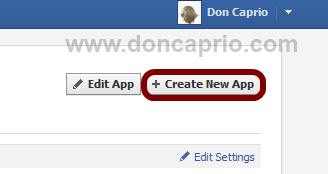
i. Head on to facebook developer page, you should create a new app by clicking the button at the top right.
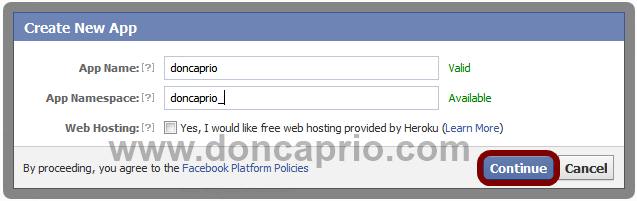
ii. Enter your application name and namespace,input the captcha code and proceed.

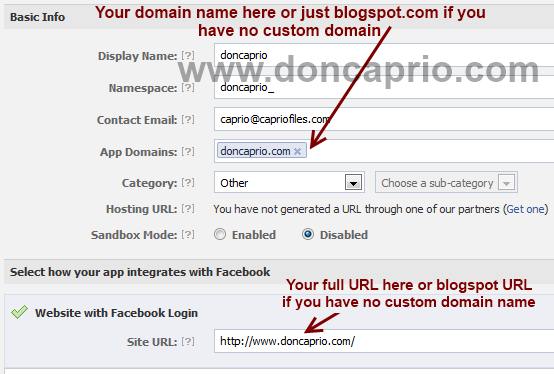
iii. On the next page, enter your custom domain name (if you’re using a custom domain) or just blogspot.com (if you’re using blogspot sub domain) in the space provided for App domain.
For App website, enter you blog URL. ( http://www.xyz.com/ or http://xyz.blogspot.com/ ). Be sure it starts with http:// and ends with / as shown in the screenshot below:

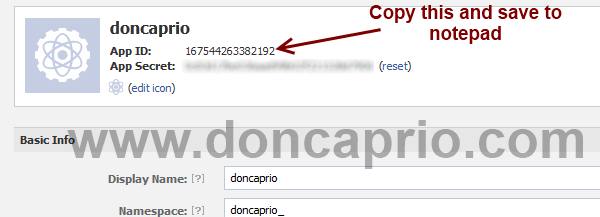
iv. Scroll down a bit and hit the Save Changes button. Now you’re done with creating your facebook application but there’s one more thing to do. On that same page, you should see your application ID. Copy it and save somewhere, you’re gonna be needing it.

iii. On the next page, enter your custom domain name (if you’re using a custom domain) or just blogspot.com (if you’re using blogspot sub domain) in the space provided for App domain.
For App website, enter you blog URL. ( http://www.xyz.com/ or http://xyz.blogspot.com/ ). Be sure it starts with http:// and ends with / as shown in the screenshot below:
iv. Scroll down a bit and hit the Save Changes button. Now you’re done with creating your facebook application but there’s one more thing to do. On that same page, you should see your application ID. Copy it and save somewhere, you’re gonna be needing it.
2. Adding the codes to your template
Log in to your blogger account and click on Template > Edit HTML > Check Expand Widget Template
i. Press Ctrl + F and search for this code:
<html
This should be found on the second or third line of your template.
- Right in front of this, add the following code:
i. Press Ctrl + F and search for this code:
<html
This should be found on the second or third line of your template.
- Right in front of this, add the following code:
xmlns:fb='http://www.facebook.com/2008/fbml'
-Be sure to have a space before and after this code. Take a look at the example below:
<html xmlns:fb='http://www.facebook.com/2008/fbml' expr:dir='data:blog…………..2005/gml/expr' >
ii. Press CTRL + F on your keyboard and search for this:
<body>
If you can’t find this, search for something similar. You should search for this instead:
<body>
If you can’t find this, search for something similar. You should search for this instead:
<body expr:class='"loading" + data:blog.mobileClass'>
In the next line, paste this code:
<div id="fb-root"></div>
<script>
window.fbAsyncInit = function() {
FB.init({
appId : 'YOUR APPLICATION ID HERE',
status : true, // check login status
cookie : true, // enable cookies to allow the server to access the session
xfbml : true // parse XFBML
});
};
(function() {
var e = document.createElement('script');
e.src = document.location.protocol + '//connect.facebook.net/en_US/all.js';
e.async = true;
document.getElementById('fb-root').appendChild(e);
}());
</script>
Be sure to replace YOUR APPLICATION ID HERE with the application ID I asked you to copy earlier, remember?
iii. Now, let’s add the open graph meta tag. Search for this code in your template:
</head>
In the line above it, paste this piece of code:
<meta property="fb:app_id" content="YOUR_APP_ID" />
Replace YOUR_APP_ID with that same application ID you previously copied.
iv. Now here’s the last part of tweaking your template your template to make it display Facebook comment box. The last thing is the iframe to display the comment box where you want. Search for this in your template:
<data:post.body/>
If you’re using a magazine style template, you’re likely to have more than one occurrence of this. Using the wrong one won’t make the comment show up. If you’re not sure about which one to use, search for this instead:
<div class='post-footer-line post-footer-line-1'>
In the line just below it, paste this code:
<b:if cond='data:blog.pageType == "item"'>
<style>
.doncaprio-share-buttons
{
-webkit-border-radius: 5px;
-moz-border-radius: 5px;
border-radius: 5px;
border:1px solid #BBBBBB;
background-color:#F2F2F2;
-webkit-box-shadow: #B3B3B3 5px 5px 5px;
-moz-box-shadow: #B3B3B3 5px 5px 5px;
box-shadow: #B3B3B3 5px 5px 5px;
padding: 5px;
margin: 10px;
}
</style>
<p align='center'>
<div align='center' class='doncaprio-share-buttons' style='background: #f2f2f2;'>
<font size='6'><strong>Post a Comment</strong></font>
<br/>
<script src='http://connect.facebook.net/en_US/all.js#xfbml=1'/>
<div><fb:comments expr:href='data:post.url' expr:title='data:post.title' expr:xid='data:post.id' width='450'/></div><div align='right'/></div></p></b:if><span class='post-comment-link'>
<b:if cond='data:blog.pageType != "item"'>
<b:if cond='data:blog.pageType != "static_page"'>
<b:if cond='data:post.allowComments'>
<b:include data='post' name='comment_count_picker'/>
</b:if>
</b:if>
</b:if>
</span> <span class='post-icons'>
<!-- email post links -->
<b:if cond='data:post.emailPostUrl'>
<span class='item-action'>
<a expr:href='data:post.emailPostUrl' expr:title='data:top.emailPostMsg'>
<img alt='' class='icon-action' height='13' src='http://img1.blogblog.com/img/icon18_email.gif' width='18'/>
</a>
</span>
</b:if>
Save your template, the Facebook comment form should now appear. If it looks rather small, replace width=’450′ with width=’600′. This increases the width from 450px to 600px.
<div id="fb-root"></div>
<script>
window.fbAsyncInit = function() {
FB.init({
appId : 'YOUR APPLICATION ID HERE',
status : true, // check login status
cookie : true, // enable cookies to allow the server to access the session
xfbml : true // parse XFBML
});
};
(function() {
var e = document.createElement('script');
e.src = document.location.protocol + '//connect.facebook.net/en_US/all.js';
e.async = true;
document.getElementById('fb-root').appendChild(e);
}());
</script>
Be sure to replace YOUR APPLICATION ID HERE with the application ID I asked you to copy earlier, remember?
iii. Now, let’s add the open graph meta tag. Search for this code in your template:
</head>
In the line above it, paste this piece of code:
<meta property="fb:app_id" content="YOUR_APP_ID" />
Replace YOUR_APP_ID with that same application ID you previously copied.
iv. Now here’s the last part of tweaking your template your template to make it display Facebook comment box. The last thing is the iframe to display the comment box where you want. Search for this in your template:
<data:post.body/>
If you’re using a magazine style template, you’re likely to have more than one occurrence of this. Using the wrong one won’t make the comment show up. If you’re not sure about which one to use, search for this instead:
<div class='post-footer-line post-footer-line-1'>
In the line just below it, paste this code:
<b:if cond='data:blog.pageType == "item"'>
<style>
.doncaprio-share-buttons
{
-webkit-border-radius: 5px;
-moz-border-radius: 5px;
border-radius: 5px;
border:1px solid #BBBBBB;
background-color:#F2F2F2;
-webkit-box-shadow: #B3B3B3 5px 5px 5px;
-moz-box-shadow: #B3B3B3 5px 5px 5px;
box-shadow: #B3B3B3 5px 5px 5px;
padding: 5px;
margin: 10px;
}
</style>
<p align='center'>
<div align='center' class='doncaprio-share-buttons' style='background: #f2f2f2;'>
<font size='6'><strong>Post a Comment</strong></font>
<br/>
<script src='http://connect.facebook.net/en_US/all.js#xfbml=1'/>
<div><fb:comments expr:href='data:post.url' expr:title='data:post.title' expr:xid='data:post.id' width='450'/></div><div align='right'/></div></p></b:if><span class='post-comment-link'>
<b:if cond='data:blog.pageType != "item"'>
<b:if cond='data:blog.pageType != "static_page"'>
<b:if cond='data:post.allowComments'>
<b:include data='post' name='comment_count_picker'/>
</b:if>
</b:if>
</b:if>
</span> <span class='post-icons'>
<!-- email post links -->
<b:if cond='data:post.emailPostUrl'>
<span class='item-action'>
<a expr:href='data:post.emailPostUrl' expr:title='data:top.emailPostMsg'>
<img alt='' class='icon-action' height='13' src='http://img1.blogblog.com/img/icon18_email.gif' width='18'/>
</a>
</span>
</b:if>
Save your template, the Facebook comment form should now appear. If it looks rather small, replace width=’450′ with width=’600′. This increases the width from 450px to 600px.
3. Enabling notification for comments on every post
This is the last part and it’s optional but I recommend it. Enabling
this lets you know whenever someone comments on your blog. You get a
regular notification on Facebook and you can visit your blog to reply
the comment.
- Visit this URL: https://developers.facebook.com/tools/comments/?id=YOUR_APP_ID
- Be sure to replace YOUR_APP_ID with your real application ID
- On the page that opens, click on settings and add yourself as moderator

Read Full Article Here
- Visit this URL: https://developers.facebook.com/tools/comments/?id=YOUR_APP_ID
- Be sure to replace YOUR_APP_ID with your real application ID
- On the page that opens, click on settings and add yourself as moderator
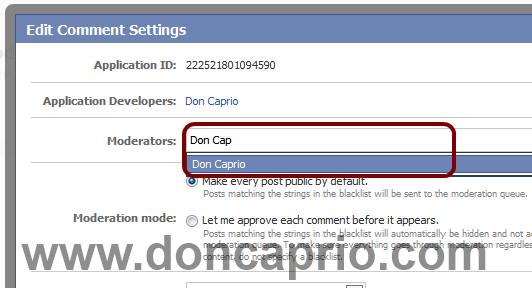
Read Full Article Here
Facebook has announced Facebook Graph Search: A search tool for Facebook content
Mark Zuckerberg
"We are not indexing the web. We are indexing our map of the graph, which is really big and constantly changing. Almost a million new people every day. 240 billion photos. 1 billion people. 1 trillion connections."

"We are not indexing the web. We are indexing our map of the graph, which is really big and constantly changing. Almost a million new people every day. 240 billion photos. 1 billion people. 1 trillion connections."
Facebook To Start Super-Sizing Link Previews In News Feed
Facebook is apparently testing a new way for links to become more prominent in the news feed. According to sister site Inside Facebook, the link preview image will grow from 90 x 90 pixels to 154 x 154.

Facebook brings back ‘Like Page’ button for page post ads in desktop feed, not mobile
Facebook brings back ‘Like Page’ button for page post ads in desktop feed, not mobile

Best 11 Facebook Promotion Apps
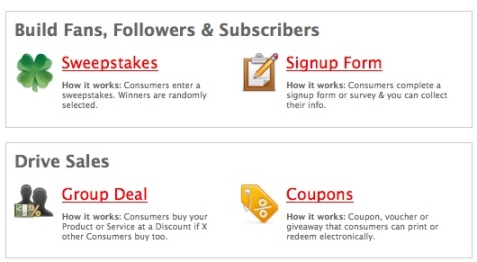
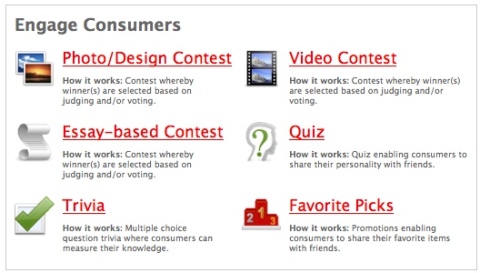
You can choose among 10 different types of promotions, including photo, video, quiz, trivia and more:


A More Effective Way of Posting Links on Facebook Pages
Make a simple change to the way you post links on Facebook Pages and more fans are then likely to see your content in their Facebook news feed.

Facebook Gets Into Local Search With “Facebook Nearby”

How to Effectively Stop Wasting Time on Facebook
How to Effectively Stop Wasting Time on Facebook http://shar.es/hquPA
How to Effectively Stop Wasting Time on Facebook

Ignore Games Requests
Turn Off Facebook Notifications
Create Email Filter to Stop Receiving Facebook Emails
Stop Playing Social Games and Avoid Third-Party Apps
Turn Off Chat
Bring a Timer When You’re on Facebook
Just Quit from Facebook
Read More
How to Effectively Stop Wasting Time on Facebook

Ignore Games Requests
Turn Off Facebook Notifications
Create Email Filter to Stop Receiving Facebook Emails
Stop Playing Social Games and Avoid Third-Party Apps
Turn Off Chat
Bring a Timer When You’re on Facebook
Just Quit from Facebook
Read More
Subscribe to:
Posts (Atom)